✦
✧
✦
ONE READER. MORE CONNECTIONS.
Your Files.
Ready Wherever You Go.
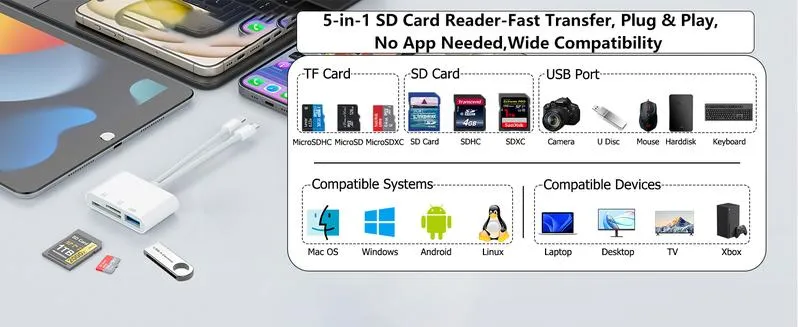
Move photos, videos and files between compatible devices with a compact 5-in-1 card reader. Featuring USB-C and Lightning connectors, multiple card slots and USB 3.0 data transfer.
- 🔌 USB-C + Lightning
- 💾 SD + TF + USB
- ⚡ Up to 5Gbps*
- 📱 Plug & Play
01 / ONE COMPACT SOLUTION
More Ways To Connect. Less Hassle.
No more carrying several different adapters. This dual-interface card reader brings multiple connection options together in one compact accessory.
Connect compatible memory cards and USB devices to your phone, tablet or computer, making everyday file access more convenient.
-
🔌 Dual Interface Design
USB-C and Lightning connectors for compatible devices.
-
💾 Multiple Storage Options
Supports SD, SDHC, Micro SD (TF) and USB flash drives.
-
📱 Convenient File Access
Access supported files without relying on cloud storage.
02 / WIDE DEVICE COMPATIBILITY
One Reader. Multiple Devices.
Switch between compatible devices with the appropriate connector. A practical companion for photographers, students, travelers and everyday digital users.
🍎 iPhone & iPad
Lightning and USB-C models with supported operating systems.
💻 MacBook
Connect through a compatible USB-C interface.
📷 Digital Cameras
Read supported SD and Micro SD memory cards.
🎵 USB Accessories
Supports compatible USB peripherals and storage devices.
Designed for use with digital photography equipment from brands such as Canon, Nikon, Sony and Samsung, subject to device and file-format compatibility.
03 / DATA TRANSFER
Less Waiting.
More Creating.
5Gbps* USB 3.0
Designed for high-speed data transfer, helping streamline the process of accessing and moving files between supported storage devices.
Read and write to supported SD cards, TF cards and USB drives without repeatedly switching between different adapters.
*5Gbps is the stated interface maximum. Actual transfer speeds depend on the connected device, memory card, file type and operating system.
04 / SIMPLE FILE MANAGEMENT
Your Photos And Files, Within Reach.
Access compatible memory cards and organize supported files directly through your device's built-in file management tools.
How To Use It
01
Insert Your Card
Insert a compatible SD or TF memory card into the corresponding slot.
02
Connect Your Device
Choose the appropriate USB-C or Lightning connector.
03
Access Your Files
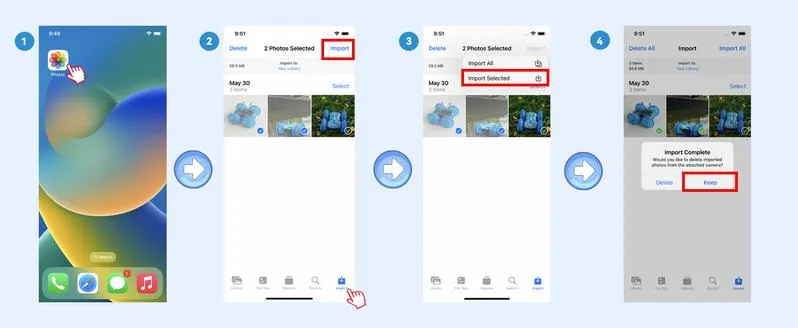
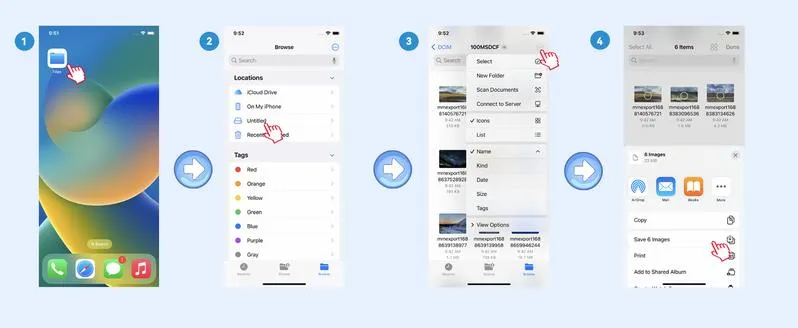
Open the Photos or Files app, depending on your device and operating system.
05 / IMPORTANT IOS INFORMATION
Know Your iOS Version.
File access can vary depending on the iOS version installed on your iPhone or iPad.
iOS 13 And Later
Use the Files app to browse compatible external storage. Depending on your device and file format, you can view, copy, move or manage supported files.
iOS 9.2–12.5.7
The Photos app supports importing compatible photos and videos from a memory card. This older system supports one-way importing from the card to the iPhone or iPad, rather than general file management.
⚠️ Compatibility Notice
Older iOS versions may only recognize photos and videos captured by digital cameras. Other file types and media may not appear. Upgrade to iOS 13 or later where supported for Files app access.
06 / MORE THAN A PHOTO READER
Useful Beyond Photography.
The USB connection also provides access to compatible accessories, making this adapter useful for more than transferring camera photos.
-
🎮 Game Controllers
Connect supported USB gaming accessories.
-
🎧 USB Headphones
Use compatible USB audio devices.
-
🎹 MIDI Keyboards
Connect supported music equipment.
-
🎸 Musical Accessories
Connect compatible USB musical instruments and peripherals.
-
💽 USB Flash Drives
Access supported files stored on USB storage devices.
Peripheral compatibility and power requirements vary by device. Some accessories may require additional power or compatible software.
07 / PRODUCT INFORMATION
Product Details.
-
Product Type5-in-1 Dual Interface Card Reader
-
ConnectorsUSB-C + Lightning
-
Memory Card SupportSD / SDHC / Micro SD (TF)
-
USB SupportCompatible USB flash drives and peripherals
-
InterfaceUSB 3.0
-
Maximum Stated SpeedUp to 5Gbps
-
ConnectionPlug & Play, subject to device compatibility
Before Ordering: Please check your device's connector type and operating system compatibility. Actual functionality may vary between iOS, Android and computer devices.
Frequently Asked Questions
Does it support both USB-C and Lightning?
Yes. It features both connector types for compatible devices. Select the appropriate connector for your phone, tablet or computer.
What memory cards does it support?
It supports SD, SDHC and Micro SD (TF) memory cards, as well as compatible USB flash drives.
Do I need to install an app?
For supported devices, you can generally use the built-in Photos or Files app. Some external accessories or file formats may require compatible software.
Can I transfer files both ways?
File transfer functionality depends on the device and operating system. Older iOS 9.2–12.5.7 devices are limited to one-way photo and video importing through the Photos app.
Does it support 5Gbps transfer speed?
The USB 3.0 interface is rated for up to 5Gbps. Actual speeds depend on the connected device, memory card and other hardware limitations.
Can it connect to USB accessories?
It supports compatible USB devices, including flash drives and certain peripherals. Some devices may require additional power or software.
✦
✧
YOUR DIGITAL LIFE, CONNECTED
One Small Adapter.
So Many Possibilities.
From camera memories to everyday files, enjoy a more convenient way to connect your storage and compatible devices.
Connect. Access. Transfer. Create.